Consumer apps
Direct-to-user apps distributed through the App Store.
Native Swift/SwiftUI apps or a shared Flutter codebase for iPhone and iPad — built for a clean App Store submission and a codebase you can keep extending after launch.
This covers new iOS apps and modernising existing ones. We work in Swift and SwiftUI for native builds, or Flutter/Dart when one codebase should cover iPhone, iPad and Android. The app is connected to your REST or GraphQL API or existing backend, with push notifications and in-app purchases where the product needs them, beta builds shared through TestFlight, and the App Store listing, screenshots and review-guideline checks handled on the first submission.
Swift and SwiftUI for native builds, Flutter/Dart when a shared iOS + Android codebase makes more sense, with Firebase-style backends and TestFlight for beta distribution.
Map the screens, user flows and data the app needs.
Design the interface and plan the app's technical structure.
Build the app against the design and API/backend contract.
Test on real devices, then prepare and submit the App Store listing.
Direct-to-user apps distributed through the App Store.
Tools for internal teams or B2B customers.
Booking, delivery and marketplace-style apps.
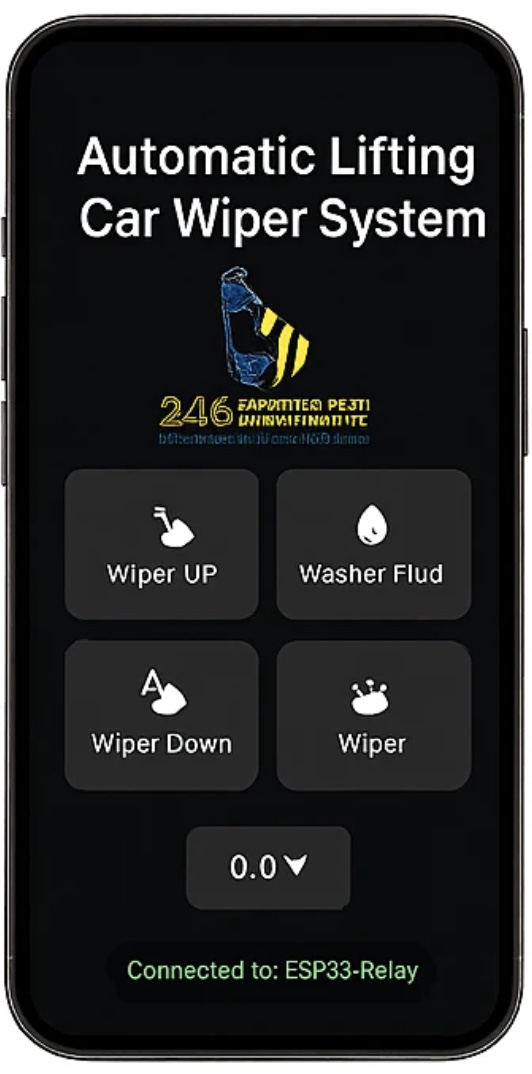
An iOS app for a custom automatic car wiper system — Bluetooth scanning and pairing, then direct control of wiper lift, wipe and washer-fluid actuation on a vehicle-mounted relay module.
Bring the same app to Android.
A companion web dashboard or admin panel.
If the app needs to talk to hardware.
Key platform differences in user demographics, monetization, development cycles, and hardware support.
Evaluating iOS performance, Swift/SwiftUI advantages, cross-platform code reuse, and long-term maintenance.
Detailed MVP budgeting, complexity tiers, timeline benchmarks, App Store fees, and backend costs.
CoreBLE integration, background device syncing, Wi-Fi onboarding, and real-time sensor dashboards for iOS.
Common questions about scope, tools and delivery. For general questions about working with us, see the main FAQ page.
Yes. Native development in Swift and SwiftUI is our default for iPhone and iPad apps that need platform-specific UI and performance.
Yes. When a shared codebase fits, we build one Flutter app that ships to both the App Store and Google Play.
Yes. We prepare the App Store listing and screenshots, distribute beta builds through TestFlight, and handle submission and review feedback.
Yes. We take over an existing Swift or Flutter codebase to fix issues, modernise the UI, add features or improve performance.
Yes. We connect the app to REST or GraphQL APIs and existing backends, or build the backend if one doesn't exist yet.
Yes. Delivery includes the full source code, build and signing instructions, API and integration documentation, and the App Store listing assets.
Tell us what you're building and what it needs to do.