
Mobile app development cost is one of the first questions businesses, startups, and entrepreneurs ask when planning a new application.
The answer is not a single number.
The cost of building a mobile app depends on its features, complexity, platforms, design, backend infrastructure, integrations, security requirements, and long-term goals.
A relatively simple application may require only a modest development budget, while a sophisticated marketplace, SaaS platform, IoT companion app, or enterprise application can require a much larger investment.
In this guide, we\x27ll explain the major factors that influence mobile app development cost in 2026 and help you understand how to plan a realistic budget.
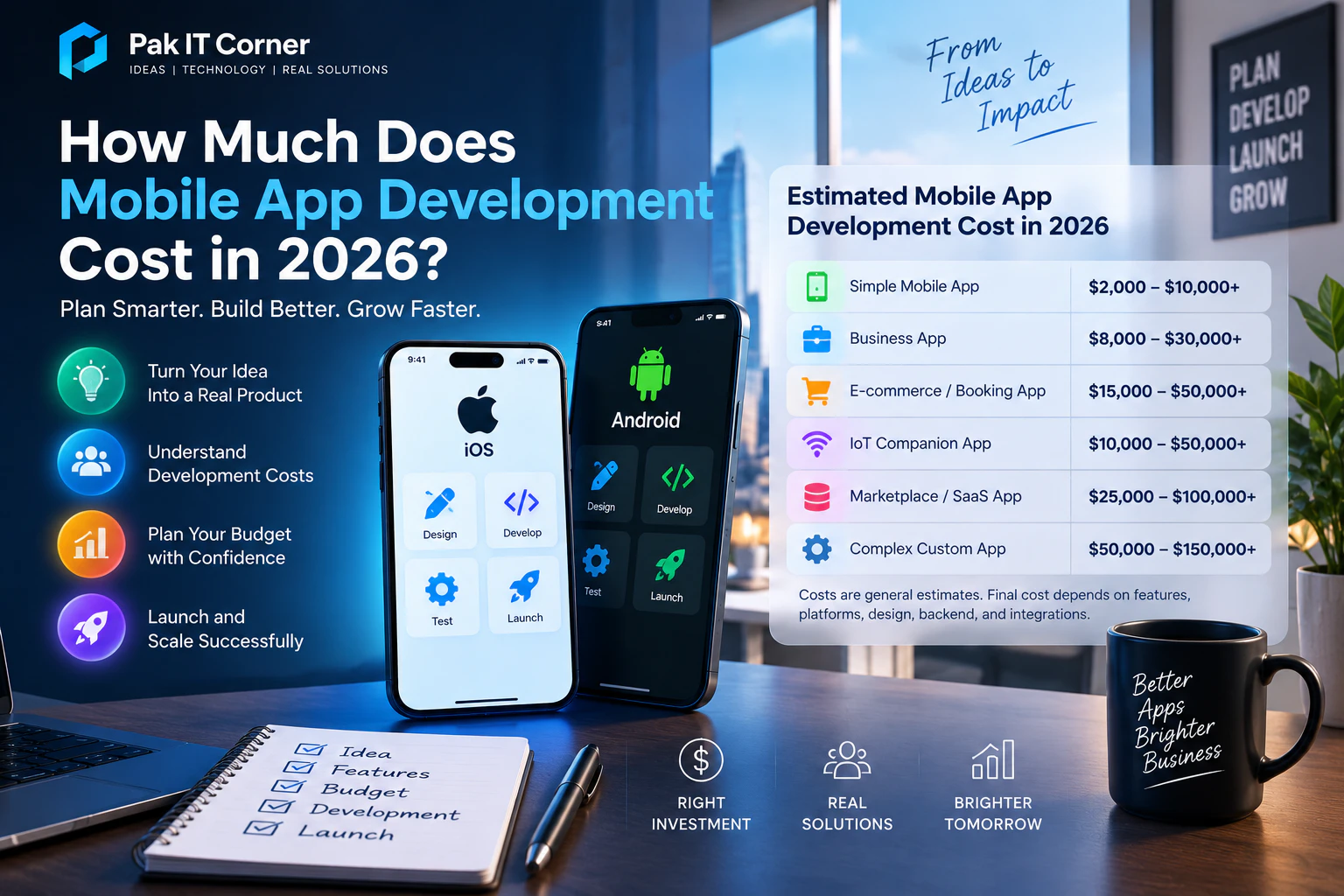
How Much Does Mobile App Development Cost in 2026?
The following ranges can be useful as general planning estimates:
| App Type | Estimated Development Cost |
|---|---|
| Simple Mobile App | $2,000–$10,000+ |
| Business App | $8,000–$30,000+ |
| E-commerce / Booking App | $15,000–$50,000+ |
| IoT Companion App | $10,000–$50,000+ |
| Marketplace / SaaS App | $25,000–$100,000+ |
| Complex Custom Application | $50,000–$150,000+ |
These figures are general planning estimates, not fixed quotations.
The actual development cost can vary significantly depending on the requirements of the project, development approach, integrations, design complexity, security, testing, and infrastructure.
Two apps that look similar on the surface can have very different costs behind the scenes.
1. App Complexity
One of the biggest factors affecting mobile app development cost is complexity.
A simple application might include:
- Basic navigation
- A small number of screens
- Static content
- Contact forms
- Simple calculations
- Basic user settings
A medium-complexity application may include:
- User accounts
- Authentication
- Cloud database
- API integrations
- Push notifications
- Location services
- Payments
- Admin dashboard
- User profiles
A complex application may require:
- Real-time communication
- IoT device connectivity
- Advanced analytics
- Multiple user roles
- Subscription management
- Marketplace functionality
- Offline synchronization
- Complex backend infrastructure
- AI integrations
- Advanced security
More features do not simply mean more screens. They also create additional development, testing, backend, security, and maintenance requirements.
2. Number of Platforms
The next major decision is which platforms your app needs to support.
Common options include:
- Android only
- iOS only
- Android and iOS
Building for one platform generally requires less development effort than creating and maintaining separate native applications for both platforms.
For example:
- Android → Kotlin
- iOS → Swift / SwiftUI
If your users are concentrated on one platform, launching there first may be a practical way to reduce initial development cost — as explored in our guide on choosing iOS or Android first.
If your target audience uses both Android and iOS, you can either develop separate native applications or consider a cross-platform framework.
3. Native vs Cross-Platform Development
The development approach can significantly affect cost and timeline.
Native development typically means building separate applications for Android and iOS using technologies designed specifically for each platform.
Cross-platform frameworks such as Flutter allow developers to share much of the application code between Android and iOS.
A simplified architecture might look like:
Flutter Codebase → Android App + iOS App
Cross-platform development can be particularly useful for:
- Startup MVPs
- Business applications
- Booking applications
- E-commerce apps
- IoT companion apps
- Applications with similar features on Android and iOS
Native development may be preferable when a product requires extensive platform-specific behavior, specialized integrations, or deep operating-system functionality — see our full breakdown of Flutter vs native app development.
The least expensive option is not automatically the best option. The development architecture should match the product\x27s long-term requirements.
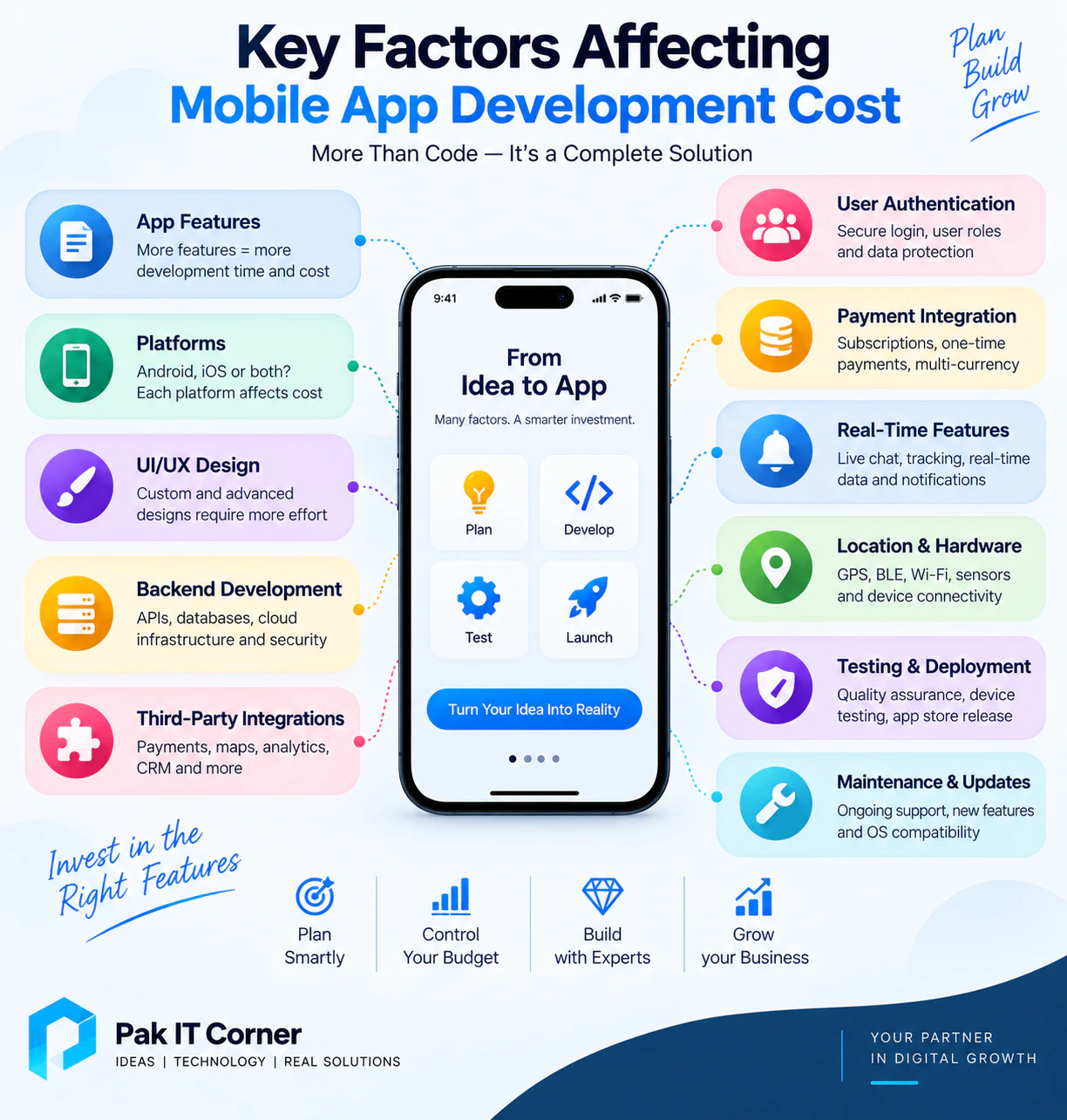
4. UI/UX Design
Design also influences mobile app development cost.
A basic application using relatively standard interface components will generally require less design and implementation effort.
A highly customized application may require:
- Custom user journeys
- Original visual design
- Custom icons
- Animations
- Interactive transitions
- Advanced dashboards
- Data visualization
- Dark and light themes
- Accessibility support
- Tablet layouts
- Responsive components
Good UI/UX design is not simply decoration.
It helps users understand the application, complete tasks efficiently, and interact with the product without unnecessary confusion.
More sophisticated interfaces usually require additional design, development, and testing time.
5. Backend Development
Many mobile applications require a backend.
The backend handles information and business logic that should not exist only on the user\x27s device.
A common architecture is:
Mobile App → API → Backend → Database
The backend may manage:
- User accounts
- Authentication
- Business logic
- Database operations
- Payments
- Notifications
- File storage
- Analytics
- Subscriptions
- Device information
- Administrative functions
A simple offline application may require little or no custom backend.
A marketplace, SaaS product, social platform, or IoT system may require substantial backend infrastructure — learn more about our web and backend development services.
Backend complexity should therefore be included when estimating the true cost of an application.
6. Admin Dashboard
A mobile app is often only one part of the complete product.
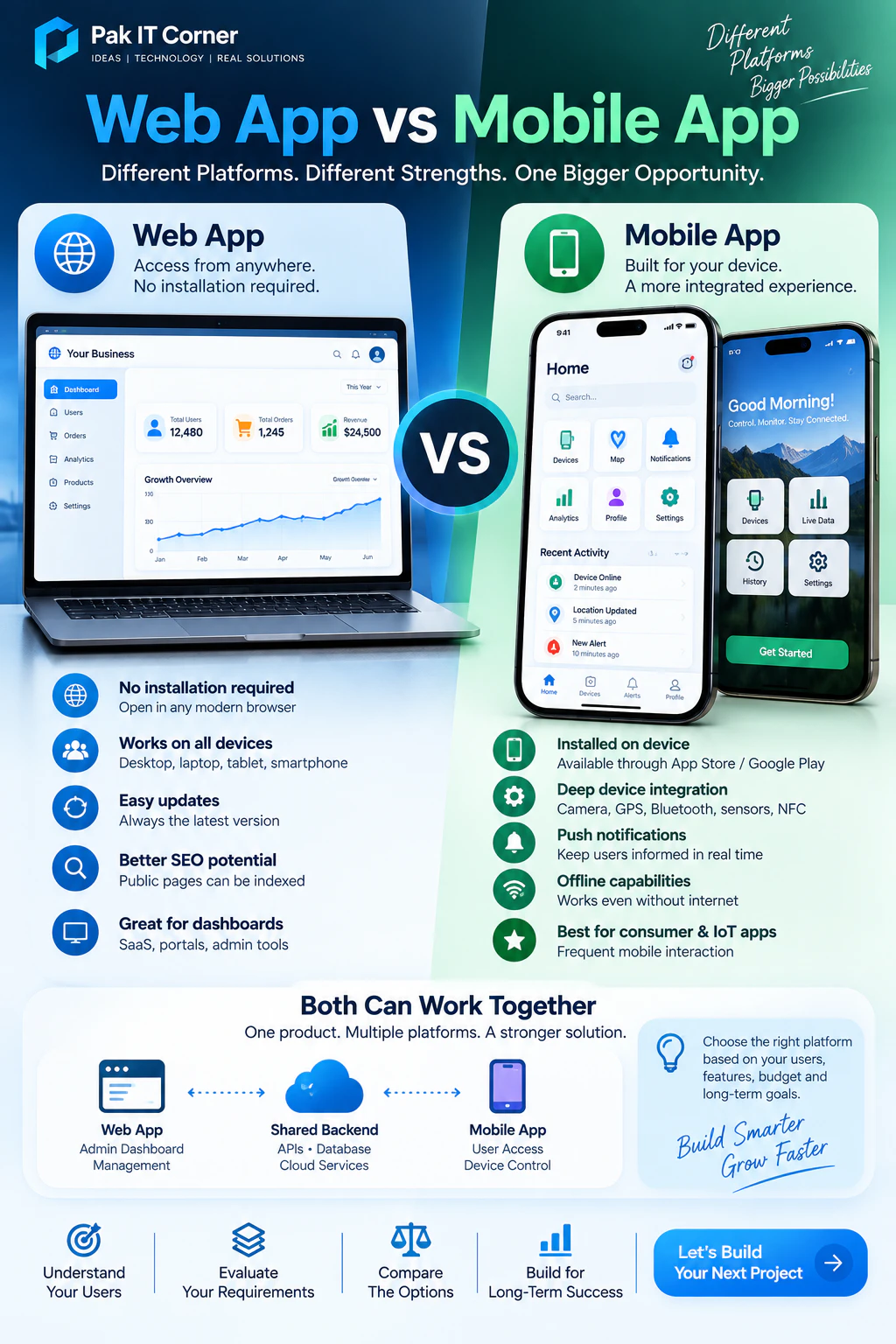
Many businesses also require a web-based admin dashboard.
For example, customers might make bookings through a mobile app while staff use a web dashboard to manage those bookings.
An admin dashboard may include:
- User management
- Order management
- Booking management
- Product management
- Reports
- Analytics
- Content management
- Device management
- Notifications
- Account controls
For an IoT application, administrators may need a dashboard for monitoring multiple connected devices, reviewing telemetry, managing users, or investigating device issues.
The dashboard is effectively another application and should be included in the project budget.
7. API and Third-Party Integrations
Modern applications frequently communicate with external platforms.
Examples include:
- Payment gateways
- Maps
- Shipping services
- Authentication providers
- Analytics platforms
- Email services
- SMS services
- AI services
- CRM systems
- Cloud storage
- Business software
Each integration requires implementation and testing.
Developers also need to handle situations such as:
- API errors
- Authentication failures
- Network interruptions
- Rate limits
- Invalid responses
- Service changes
Some integrations can be completed quickly, while others require substantial custom development.
8. Authentication and User Accounts
Applications that contain personalized information usually require secure user authentication.
Common authentication options include:
- Email and password
- Phone number verification
- Google sign-in
- Apple sign-in
- Multi-factor authentication
- Password recovery
- Biometric login
Authentication also requires backend functionality for managing sessions, permissions, accounts, and security.
An application with multiple user types can become even more complex.
For example:
- Customer → Standard Access
- Employee → Operational Access
- Administrator → Management Access
Role-based permissions must be carefully designed and tested.
9. Payment Integration
Applications that sell products, subscriptions, bookings, or services may require payment processing.
Payment functionality can include:
- One-time payments
- Subscriptions
- Recurring billing
- Refunds
- Invoices
- Transaction history
- Coupons
- Multiple currencies
- Marketplace payments
Payment systems also introduce additional security, backend, testing, and platform-policy considerations.
For this reason, an application with payments generally requires more development effort than an application without financial transactions.
10. Real-Time Features
Real-time functionality can significantly increase application complexity.
Examples include:
- Live chat
- Delivery tracking
- Location tracking
- Device monitoring
- Real-time dashboards
- Collaborative applications
- Live status updates
- Multiplayer functionality
These features may use technologies such as:
- WebSockets
- MQTT
- Firebase
- Real-time databases
- Event-driven backend services
The backend must also handle simultaneous connections and synchronization reliably.
11. Push Notifications
Push notifications are common in modern mobile applications.
They can alert users about:
- New messages
- Order updates
- Booking reminders
- Security events
- Device alarms
- Promotions
- Account activity
- Maintenance requirements
A complete notification system can involve:
Backend Event → Notification Service → User\x27s Device
The system may also require user preferences, scheduling, device-token management, and notification history.
Although notifications appear simple to users, implementing them reliably requires additional development and testing.
12. GPS and Location Services
Applications that use location services require additional development.
Examples include:
- Delivery apps
- Fleet tracking
- Navigation
- Asset tracking
- Ride services
- Field-service applications
- Location-based alerts
Location functionality can involve:
- GPS permissions
- Maps
- Geofencing
- Background location
- Route calculation
- Location history
- Server synchronization
Background location tracking can be particularly complex because Android and iOS have specific permission, battery, and privacy requirements.
13. IoT and Hardware Connectivity
IoT mobile applications introduce another layer of complexity because the software must communicate with physical hardware.
An IoT system may involve:
Sensor / Device → ESP32 or MCU → BLE/Wi-Fi → Mobile App → Cloud
The mobile application may need to:
- Discover devices
- Pair through Bluetooth
- Configure Wi-Fi
- Send commands
- Receive sensor information
- Display device status
- Monitor battery level
- Manage multiple devices
- Receive alerts
- Perform firmware updates
Hardware communication also requires a clearly defined protocol between the firmware and application — see our specialized IoT app development and hardware development services.
For example, a BLE device may use:
- Services
- Characteristics
- UUIDs
- Read operations
- Write operations
- Notifications
Because both firmware and application behavior must work together reliably, IoT app development can require additional integration and testing effort.
14. Bluetooth Low Energy Integration
BLE is frequently used for:
- Smart devices
- Fitness products
- Medical accessories
- Sensors
- Industrial equipment
- Tracking products
- Home automation
- Configuration tools
A BLE application may need to handle:
- Device scanning
- Connection
- Disconnection
- Automatic reconnection
- Pairing
- Data parsing
- Signal strength
- Multiple devices
- Background behavior
- Firmware communication
Reliable BLE integration requires testing with the actual hardware.
A simulator alone is usually not enough to verify a connected-device product.
15. Wi-Fi and Cloud Connectivity
Some connected products communicate through Wi-Fi rather than directly through Bluetooth.
A typical architecture might be:
Device → Wi-Fi → Cloud → Mobile App
This enables users to monitor or control a device remotely.
However, it may also require:
- Device provisioning
- Cloud APIs
- Authentication
- Device identity
- Databases
- Real-time communication
- Security
- Remote commands
- Device status management
These requirements increase development effort compared with a simple standalone mobile application.
16. Offline Functionality
Some applications need to continue working without an internet connection.
Examples include:
- Field-service applications
- Inspection systems
- Agricultural applications
- Travel apps
- Industrial systems
- IoT applications
Offline functionality may require:
- Local databases
- Cached information
- Queued operations
- Conflict handling
- Synchronization when connectivity returns
This adds architectural complexity because developers need to consider what happens when the same information changes locally and on the server.
17. Security Requirements
Security should be included from the beginning of application development.
A mobile application may require:
- HTTPS
- Secure authentication
- Authorization
- Encrypted communication
- Secure API design
- Secure token storage
- Input validation
- Rate limiting
- Session management
- Permission controls
IoT products may additionally require:
- Unique device identities
- Secure device authentication
- Device ownership
- Signed firmware
- Secure OTA updates
- Protected credentials
Applications handling sensitive business, financial, personal, or device information may require additional security engineering and testing.
18. Testing and Quality Assurance
Testing is an important part of development cost.
Mobile applications need to work across different:
- Devices
- Screen sizes
- Operating-system versions
- Network conditions
- User states
Testing may include:
- Functional testing
- UI testing
- API testing
- Authentication testing
- Performance testing
- Security testing
- Device testing
- Regression testing
For connected-device applications, testing should also include actual hardware.
For example:
Phone → BLE → ESP32 → Sensor
The entire communication chain should be verified rather than testing only the app interface.
19. App Store and Google Play Deployment
Completing development does not automatically mean an application is ready for users.
Mobile applications must also be prepared for distribution.
Deployment can involve:
- App signing
- Certificates
- Store listing
- Screenshots
- App descriptions
- Privacy information
- Permission declarations
- Testing tracks
- Store review
- Release management
Apple App Store and Google Play requirements can change over time, so developers need to follow the current policies during deployment.
20. Maintenance and Updates
Mobile app development does not end after launch.
Applications may require ongoing work for:
- Bug fixes
- Security updates
- Operating-system changes
- New devices
- API updates
- Backend maintenance
- New features
- Store requirements
- Performance improvements
The long-term cost of maintaining an application should therefore be considered during planning.
A well-structured codebase may reduce maintenance cost significantly compared with a rushed architecture.
21. Cloud Infrastructure Costs
Applications using cloud services may also have recurring operating costs.
Examples include:
- Cloud servers
- Databases
- File storage
- CDN services
- Authentication services
- SMS
- Push infrastructure
- Analytics
- Monitoring
- Third-party APIs
A small application may have very low infrastructure costs initially.
As the user base and data volume increase, these costs can grow.
The architecture should therefore be designed so infrastructure can scale with actual usage.
22. Hidden Costs to Consider
When estimating an app project, businesses sometimes focus only on programming.
Other possible costs include:
- UI/UX design
- Domain names
- Cloud hosting
- App-store accounts
- Third-party APIs
- Payment-processing fees
- SMS services
- Email services
- Analytics
- Maintenance
- Customer support
- Marketing
- Future feature development
Understanding these costs early helps avoid surprises later.
23. How Much Does a Simple Mobile App Cost?
A relatively simple application may cost approximately:
$2,000–$10,000+
It might include:
- Basic interface
- Limited number of screens
- Simple forms
- Static or lightly dynamic information
- Basic API connectivity
The actual price depends on the design and functionality.
24. How Much Does a Business App Cost?
A business application may fall approximately within:
$8,000–$30,000+
It may include:
- User authentication
- Cloud database
- Business workflows
- API integrations
- Notifications
- Admin dashboard
- Reporting
Applications involving multiple user roles or complex workflows may cost more.
25. How Much Does an E-Commerce or Booking App Cost?
A typical planning range might be:
$15,000–$50,000+
Features may include:
- Product or service listings
- Search
- User accounts
- Shopping cart
- Payments
- Orders
- Booking calendar
- Notifications
- Admin dashboard
The cost can increase significantly for marketplaces, complex logistics, or advanced payment systems.
26. How Much Does an IoT Mobile App Cost?
A general planning range for an IoT companion application might be:
$10,000–$50,000+
The final cost depends heavily on the device and communication architecture.
An IoT application may require:
- BLE
- Wi-Fi provisioning
- Device configuration
- Real-time telemetry
- Cloud connectivity
- Remote control
- Multiple-device support
- Alerts
- Firmware updates
- User/device ownership
If firmware, custom electronics, PCB development, cloud infrastructure, and mobile software are all part of the same product, the complete development budget can be higher.
27. How Much Does a Marketplace or SaaS App Cost?
A marketplace or SaaS mobile application may require approximately:
$25,000–$100,000+
Possible features include:
- Multiple user roles
- Subscription management
- Payments
- Messaging
- Search
- Notifications
- Analytics
- Admin dashboard
- Cloud infrastructure
- Complex business logic
Large platforms can exceed these ranges depending on scale and requirements.
28. Should You Build an MVP First?
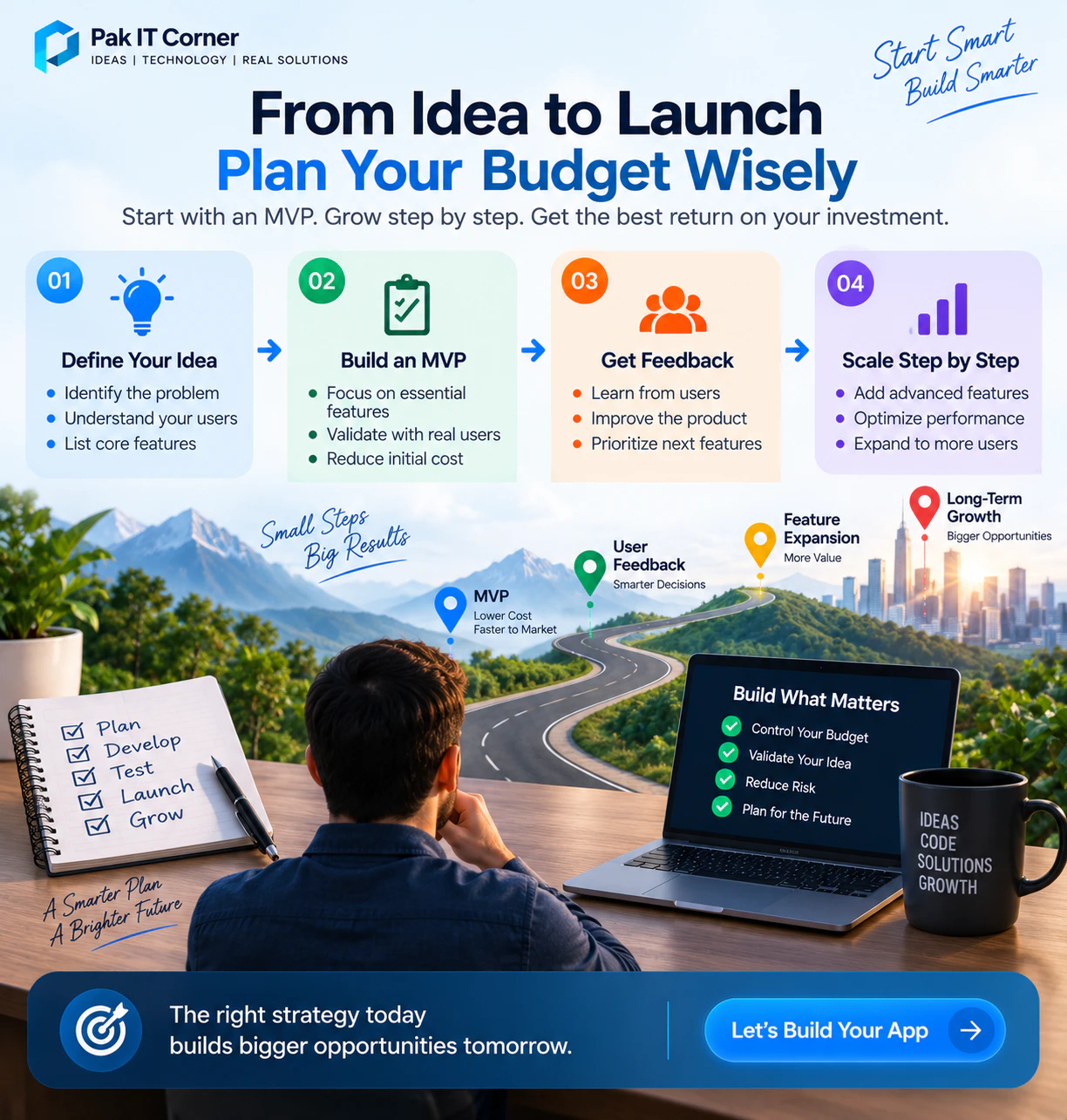
For many startups, building a Minimum Viable Product is a practical way to control initial development cost.
An MVP focuses on the smallest set of features required to validate the product.
For example, instead of initially building:
- 40 screens
- Multiple payment systems
- Advanced analytics
- AI functionality
- Complex social features
- Multiple integrations
the first release might focus on:
- Registration
- Core user workflow
- Essential backend
- Basic notifications
- One critical integration
After real users test the product, the next features can be prioritized using actual feedback.
This can reduce the risk of spending heavily on functionality users do not need.
29. Cheap Development vs Cost-Effective Development
The cheapest quote is not necessarily the lowest-cost solution over the lifetime of a product.
Poorly structured software can lead to:
- Frequent bugs
- Security problems
- Difficult maintenance
- Performance issues
- Expensive rewrites
- Store rejection problems
- Scaling difficulties
Cost-effective development focuses on building the required product with an architecture that is appropriate for its expected scale.
The objective should be to avoid unnecessary complexity without sacrificing the foundations needed for a reliable product.
30. How Long Does Mobile App Development Take?
Development time depends on the scope of the project.
A relatively simple application may take several weeks.
A larger product can require several months or more.
The development process may include:
Requirements → Architecture → UI/UX → Development → Backend → Integration → Testing → Deployment
Projects involving custom hardware may also require:
Electronics → Firmware → Communication Protocol → Mobile App → Cloud → System Testing
Good planning before development begins can prevent expensive changes later.
31. How to Reduce Mobile App Development Cost
There are several practical ways to control development cost without sacrificing the core product.
Start with an MVP
Build essential functionality first.
Define requirements clearly
Changing major requirements during development increases cost.
Prioritize features
Separate features into:
- Essential
- Important
- Future
Consider cross-platform development
If Android and iOS require similar functionality, Flutter may reduce duplicated development effort.
Use a shared backend
Design APIs so Android, iOS, web dashboards, and future applications can use the same backend.
Avoid unnecessary complexity
Do not add technologies or infrastructure simply because they are popular.
Every component should solve a real product requirement.
32. What Information Is Needed for an Accurate App Quote?
To estimate a project properly, a development team should understand:
- Purpose of the application
- Target users
- Android, iOS, or both
- Required screens
- User roles
- Authentication requirements
- Backend requirements
- Payment requirements
- Third-party integrations
- Push notifications
- GPS/location requirements
- Bluetooth or IoT connectivity
- Admin dashboard requirements
- Offline functionality
- Security requirements
- Expected number of users
- Future roadmap
Providing these details makes the estimate much more meaningful than simply asking for the price of “an app.”
33. Example: Simple Business Application
Imagine a company needs an application where customers can:
- Create an account
- Browse services
- Submit a request
- Receive notifications
- View request history
The business also needs a web dashboard where staff can:
- View customers
- Manage requests
- Update statuses
- Send notifications
This project is more than just a mobile interface.
The complete system includes:
Mobile App + Backend + Database + Admin Dashboard
All of these components should be included in the estimate.
34. Example: IoT Companion Application
Now consider an ESP32-based smart device.
The product might require:
ESP32 Device → BLE → Mobile App → Cloud
The mobile app could:
- Discover the device
- Connect through BLE
- Configure Wi-Fi
- Display sensor readings
- Control outputs
- Show battery status
- Receive alerts
- Manage device settings
The cloud could provide:
- Remote monitoring
- User accounts
- Device management
- Historical data
- Notifications
This type of project requires coordination between firmware, communication protocols, mobile software, and cloud infrastructure.
Its development cost therefore depends on the complete system rather than the mobile screens alone.
35. Questions to Ask Before Setting Your Budget
Before deciding how much to invest in an application, ask:
- Who will use the app?
- What problem does it solve?
- Which features are essential for launch?
- Do we need Android, iOS, or both?
- Do we need a backend?
- Do we need an admin dashboard?
- Will users make payments?
- Do we need notifications?
- Does the app connect to hardware?
- Is BLE or Wi-Fi required?
- Does the application need GPS?
- Is offline operation important?
- What third-party services are required?
- How many users do we expect?
- What features can wait until a later release?
Answering these questions makes it much easier to establish a realistic development scope.
Mobile App Development Cost: Final Takeaway
There is no universal price for mobile app development.
A useful planning range can start from a few thousand dollars for relatively simple applications and rise substantially for sophisticated platforms involving custom backends, payments, real-time communication, IoT connectivity, marketplaces, or enterprise requirements.
The most important step is not asking:
“What is the cheapest way to build an app?”
A better question is:
“What is the most efficient way to build the product our users actually need?”
A well-planned MVP can help control the initial budget while creating a technical foundation that can grow with the business.
How Pak IT Corner Can Help
Pak IT Corner develops mobile applications and connected digital products for startups, businesses, and hardware-based products.
Our capabilities include:
- Android app development
- iOS app development
- Flutter cross-platform development
- Backend and API development
- Web admin dashboards
- IoT companion applications
- BLE connectivity
- Wi-Fi device integration
- Cloud-connected applications
- ESP32 integration
- Custom hardware and firmware integration
For connected products, we can work across the complete communication chain:
Hardware → Firmware → BLE/Wi-Fi → Mobile App → Backend → Cloud
This helps reduce integration problems between separate hardware and software components — see examples in our portfolio.
Frequently Asked Questions
How much does it cost to develop a mobile app in 2026?
The cost depends heavily on complexity. A relatively simple application might fall around $2,000–$10,000+, while complex custom platforms can reach $50,000–$150,000+ or more. These are general planning estimates rather than fixed quotations.
Is Android app development cheaper than iOS?
Not necessarily. Cost depends more on functionality, design, backend requirements, integrations, and testing than the operating system alone.
Is Flutter cheaper than building separate Android and iOS apps?
It can reduce duplicated development when both platforms require similar functionality because much of the codebase can be shared. However, the best architecture depends on the specific product.
How much does an IoT app cost?
A general planning range might be around $10,000–$50,000+ for an IoT companion application, but the cost depends on BLE/Wi-Fi communication, cloud connectivity, device management, firmware integration, OTA requirements, and other features.
Does app development cost include the backend?
Not always. When comparing quotations, confirm whether backend development, database setup, APIs, hosting, admin dashboards, testing, and deployment are included.
Should I build an MVP before the complete application?
For many startups, yes. An MVP can validate the core product with real users before investing in less critical functionality.
Are maintenance costs included in app development?
Usually, ongoing maintenance should be considered separately. Applications may need future updates for operating systems, APIs, security, bug fixes, and new features.
How can I get an accurate mobile app development quote?
Prepare a clear list of required features, target platforms, user roles, integrations, backend requirements, and future goals. A development team can then estimate the project based on actual scope rather than assumptions.
Ready to Estimate Your Mobile App Project?
Every successful application starts with a clear understanding of its users, features, technical requirements, and business goals.
Instead of choosing a development budget based only on an average price, define what the first version of your product actually needs.
Pak IT Corner can help you plan, design, and develop Android, iOS, Flutter, web, and IoT-connected applications — from the first prototype to a production-ready product.