
The Internet of Things has changed the way people interact with physical devices.
From smart-home systems and GPS trackers to industrial sensors, agricultural monitoring systems, healthcare devices, and connected appliances, users increasingly expect physical products to connect directly to smartphones and cloud platforms.
A well-designed IoT mobile application provides the bridge between the user and the hardware.
It can allow users to configure devices, monitor sensor data, control equipment, receive alerts, update settings, and manage multiple connected products from a single interface.
Two of the most common technologies used to connect IoT hardware with mobile applications are Bluetooth Low Energy (BLE) and Wi-Fi.
Both technologies are powerful, but they solve different problems.
This guide explains how IoT applications communicate with hardware using BLE and Wi-Fi, how the complete system is structured, and what should be considered when developing a reliable connected product.
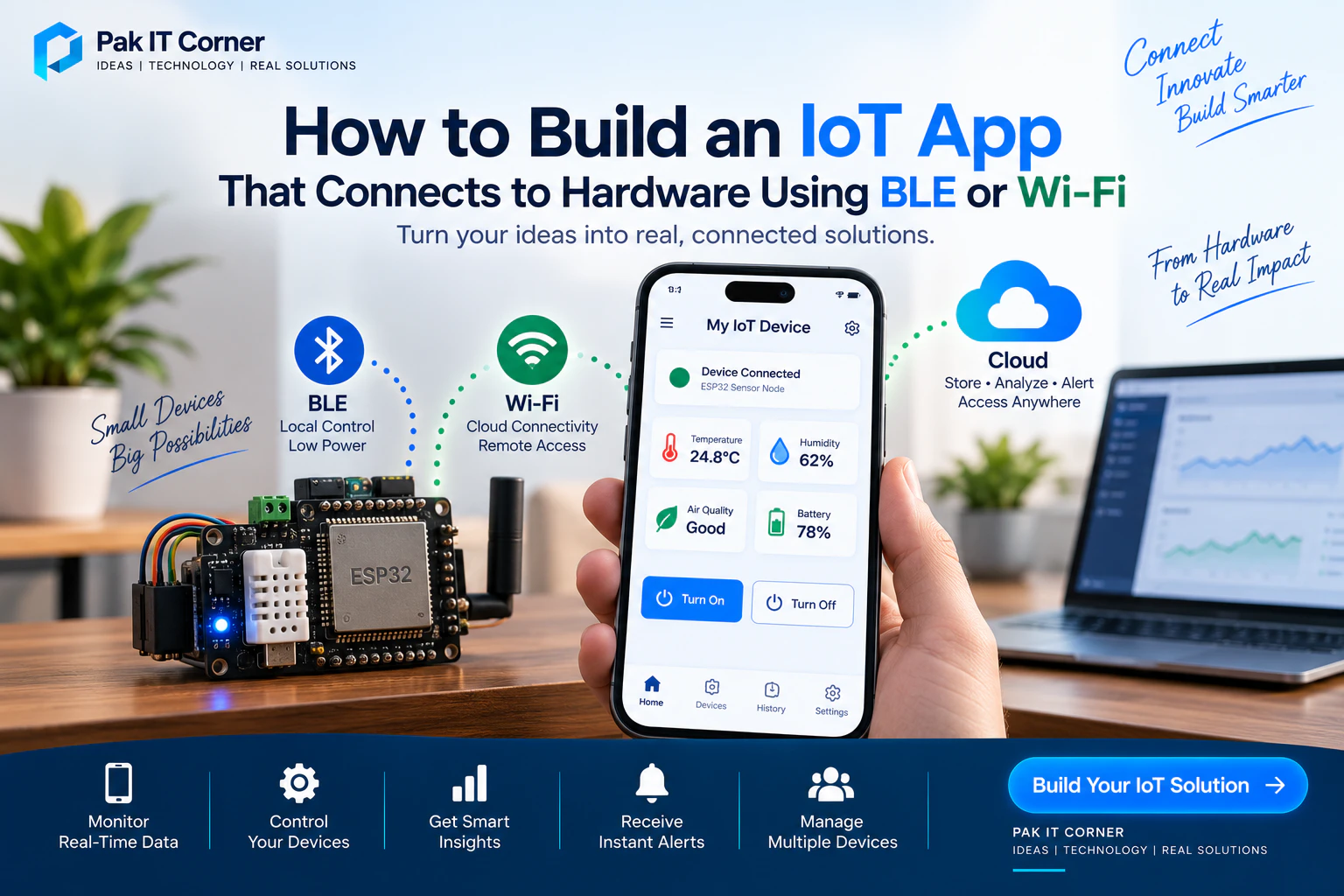
What Is an IoT App?
An IoT app is a mobile or web application designed to communicate with physical connected devices.
The device may contain a microcontroller such as:
- ESP32
- ESP32-S3
- STM32
- Nordic nRF52
- Raspberry Pi
- Arduino-compatible controller
- Other Wi-Fi or Bluetooth-enabled hardware
The hardware can collect information from sensors, control outputs, communicate with a server, and exchange information with the application.
For example, an environmental monitoring device might measure:
- Temperature
- Humidity
- Air quality
- Pressure
- Battery level
The mobile application could then display this information in real time while allowing the user to configure thresholds and receive alerts.
How Does an IoT System Work?
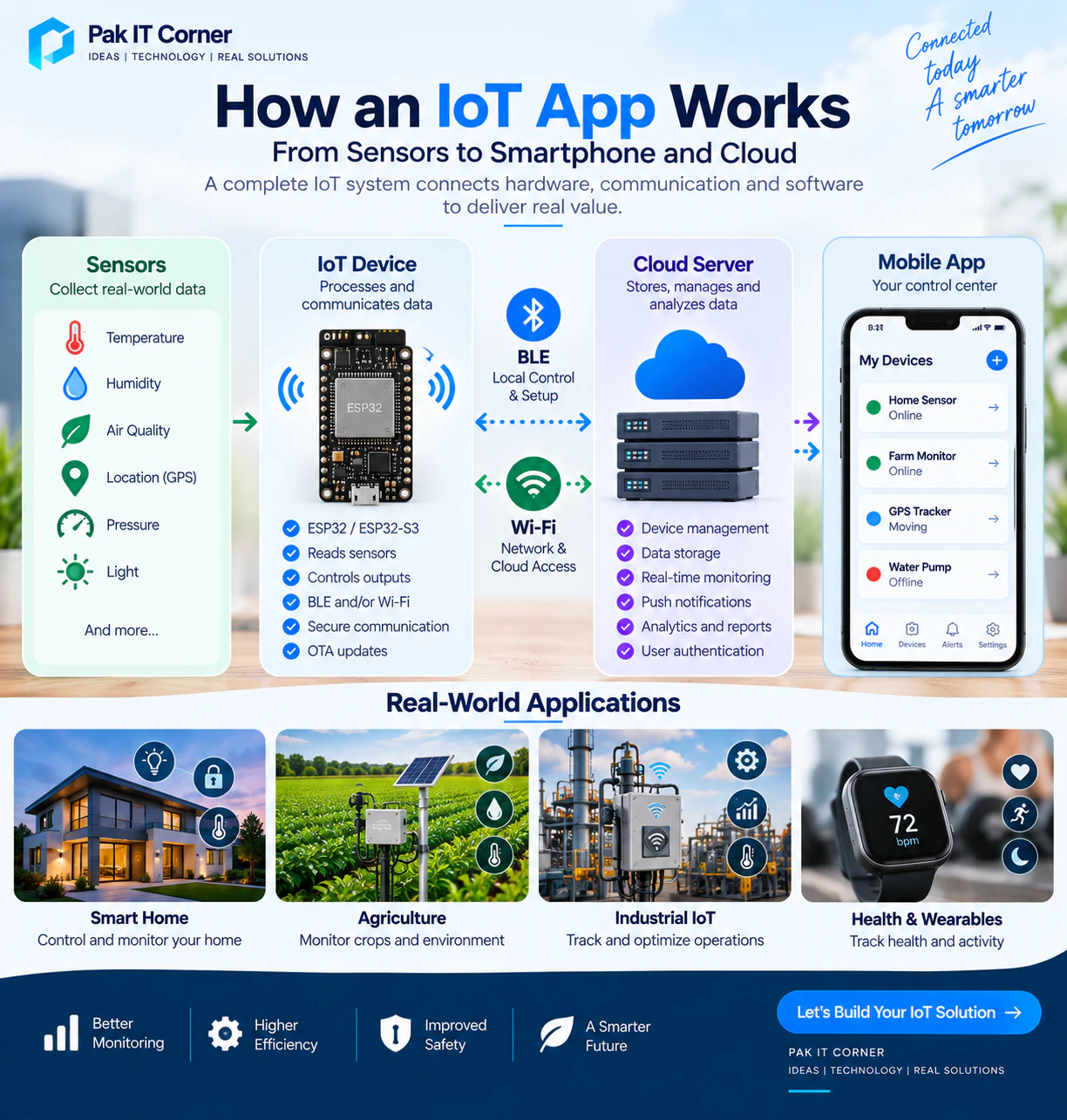
A complete IoT system normally contains several layers.
A simplified architecture may look like this:
Sensors → IoT Device → Communication → Mobile App or Cloud → User
For example:
Temperature Sensor → ESP32 → BLE → Mobile App
For a cloud-connected system:
Sensor → ESP32 → Wi-Fi → Cloud Server → Mobile App
A more advanced product may combine both:
Sensors → ESP32 → BLE + Wi-Fi → Mobile App + Cloud
Each part has a different responsibility.
The sensors collect information from the physical environment.
The microcontroller processes the information.
BLE or Wi-Fi transports the data.
The backend may store and analyze information.
The mobile application provides the interface that users interact with.
Why IoT Devices Need Companion Apps
A physical IoT product may have only a few buttons, LEDs, or a small display.
A mobile application provides a much more powerful interface.
Through an IoT companion app, users can:
- Configure the device
- Connect it to Wi-Fi
- View real-time sensor information
- Control outputs
- Change settings
- View historical information
- Check battery status
- Receive alerts
- Manage multiple devices
- Update firmware
- Diagnose connection problems
The app therefore becomes an important part of the overall product experience.
Good hardware with a poor companion app can still result in a frustrating product.
The hardware, firmware, communication protocol, mobile application, and backend should therefore be designed as parts of one connected system.
BLE vs Wi-Fi for IoT Apps
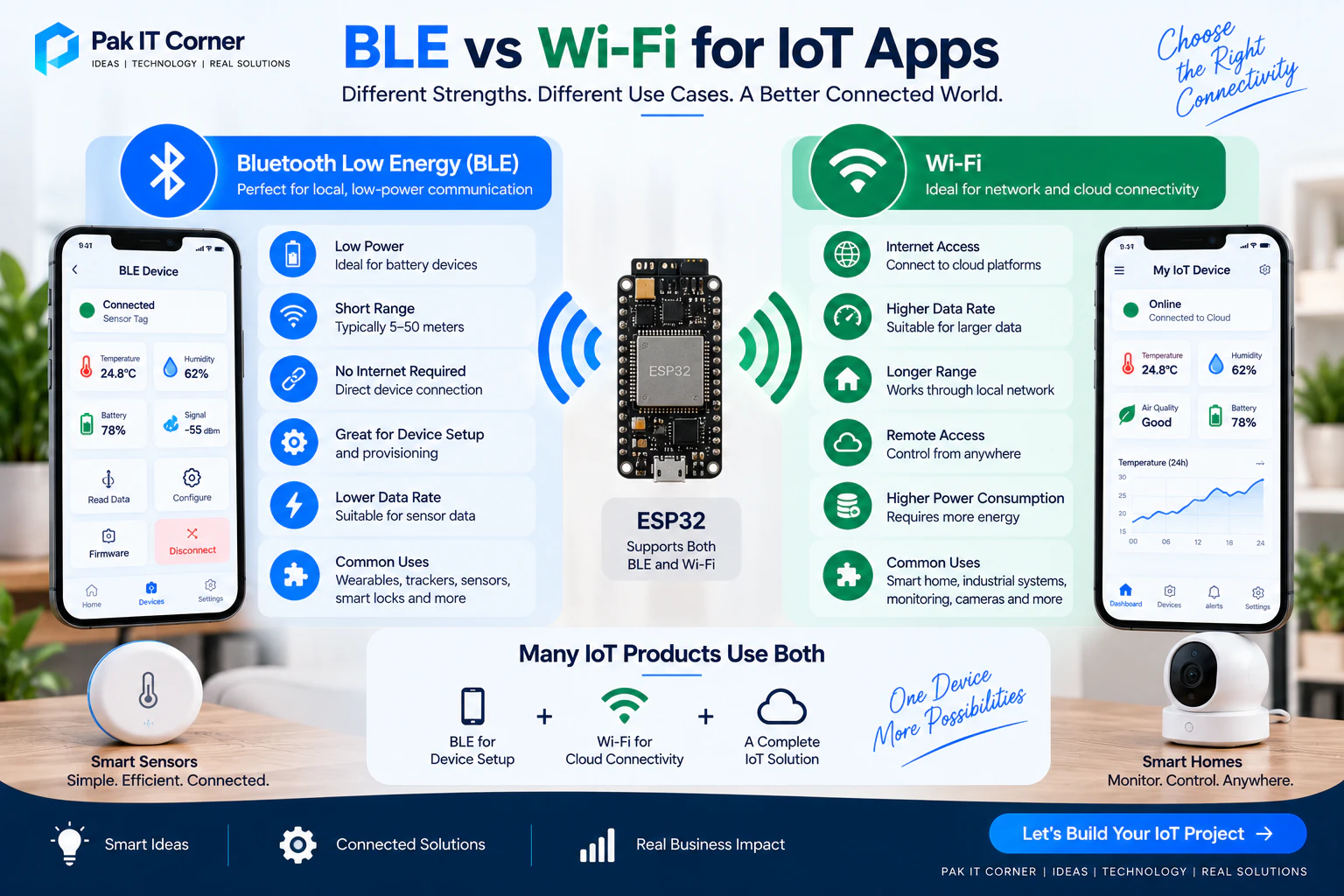
BLE and Wi-Fi are both commonly available on modern IoT microcontrollers such as the ESP32, but they have different strengths.
| Feature | BLE | Wi-Fi |
|---|---|---|
| Power Consumption | Low | Higher |
| Internet Required | No | Usually required for cloud access |
| Typical Use | Local communication | Local network and cloud communication |
| Setup | Pair/connect nearby | Requires network configuration |
| Data Rate | Lower | Higher |
| Battery Devices | Excellent | Depends on duty cycle |
| Remote Access | Not directly | Yes, through internet/cloud |
| Device Provisioning | Excellent | Requires credentials |
| Real-Time Local Control | Excellent | Excellent |
| Cloud Integration | Usually through phone/gateway | Direct |
Many professional IoT products use both technologies rather than choosing only one.
What Is Bluetooth Low Energy?
Bluetooth Low Energy is a wireless technology designed for short-range communication with relatively low power consumption.
BLE is commonly used in:
- Wearables
- Health devices
- Tracking devices
- Smart locks
- Sensors
- Fitness products
- Configuration tools
- Portable electronics
- Battery-powered IoT products
A smartphone can communicate directly with a BLE-enabled device without requiring an internet connection.
A simple architecture is:
IoT Device → BLE → Smartphone
This makes BLE particularly useful for local device setup and control.
How BLE Communication Works
BLE communication is commonly organized around:
- Services
- Characteristics
- UUIDs
- Read operations
- Write operations
- Notifications or indications
A service represents a group of related functionality.
A characteristic represents a specific piece of information or control point.
For example, an IoT environmental sensor could expose:
Environmental Service
with characteristics for:
- Temperature
- Humidity
- Battery level
- Device status
- Configuration
The application discovers these services after connecting to the device.
BLE UUIDs
BLE services and characteristics are identified using UUIDs.
For example:
Device Service UUID
4fafc201-1fb5-459e-8fcc-c5c9c331914b
A characteristic could use another UUID.
The firmware and mobile application must agree on these identifiers.
The app uses them to determine which characteristic should be read, written, or subscribed to.
A clearly documented BLE protocol is important because the mobile and firmware development teams need to interpret data in exactly the same way.
Reading Data Through BLE
Suppose an ESP32 measures temperature.
The basic flow could be:
Temperature Sensor → ESP32 → BLE Characteristic → Mobile App
The ESP32 updates the characteristic with the latest temperature.
The application can then read that value and display something like:
Temperature: 24.8°C
The same approach can be used for:
- Humidity
- Battery percentage
- Device state
- Signal information
- Sensor measurements
- Error codes
Sending Commands Through BLE
Communication can also work in the opposite direction.
For example:
Mobile App → BLE → ESP32 → Relay
The user taps an ON button.
The application sends a command to the ESP32.
The firmware validates the command and activates the output.
The device should ideally return its actual state so the application can confirm that the requested action occurred.
This is better than simply assuming that a command was successful.
BLE Notifications
Constantly requesting information from the device is not always efficient.
BLE notifications allow the device to send updated information automatically when something changes.
For example:
Sensor changes → ESP32 updates characteristic → BLE notification → Mobile app updates UI
This is useful for real-time information such as:
- Temperature
- Motion
- Device state
- Battery level
- Sensor events
- Button presses
Notifications can reduce unnecessary communication while making the interface feel responsive.
What Is Wi-Fi Communication?
Wi-Fi allows an IoT device to connect to a local network and potentially communicate directly with internet services.
A typical architecture is:
ESP32 → Wi-Fi Router → Internet → Cloud Server → Mobile App
This enables users to monitor or control a device even when they are far away from it.
For example, a user could check the temperature of a greenhouse while in another city.
That would generally not be possible using only a direct BLE connection.
Common Wi-Fi Communication Protocols
Several application-level protocols can be used over Wi-Fi.
Common options include:
- HTTP
- REST APIs
- MQTT
- WebSockets
- TCP
- UDP
The best choice depends on the product.
HTTP and REST APIs
HTTP APIs are widely used because they are straightforward to integrate with web and mobile applications.
For example, the app could request:
GET /api/device/status
The server might return:
{
  "temperature": 24.8,
  "humidity": 62,
  "battery": 78,
  "online": true
}
The application can then display the information to the user.
Commands could be sent through endpoints such as:
POST /api/device/control
REST APIs are especially useful when a cloud backend is already part of the system.
MQTT for IoT Applications
MQTT is a lightweight messaging protocol widely used in IoT systems.
Instead of repeatedly requesting information, devices and applications can publish or subscribe to topics.
For example:
devices/device123/temperature
The ESP32 could publish:
24.8
Another topic might be:
devices/device123/control
The device could subscribe to this topic and receive control commands.
MQTT works particularly well when:
- Many devices are connected
- Real-time updates are required
- Sensor data is transmitted frequently
- Communication should remain lightweight
- Cloud-based device management is required
Local Wi-Fi vs Cloud Control
Not every Wi-Fi product requires cloud infrastructure.
A device can sometimes host a local server.
For example:
Phone → Local Wi-Fi → ESP32 Web Server
The smartphone sends commands directly to the ESP32.
This can work without internet access as long as both devices are connected to the same network.
Cloud control uses a different architecture:
ESP32 → Internet → Cloud
and
Mobile App → Internet → Cloud
The cloud acts as the communication layer between them.
Cloud architecture enables remote access but introduces additional requirements including authentication, security, server infrastructure, and device management.
Why Many IoT Products Use BLE and Wi-Fi Together
One of the most effective architectures combines both technologies.
BLE handles initial setup and nearby communication.
Wi-Fi handles internet connectivity and remote access.
A common setup process is:
- Step 1: User installs the mobile application.
- Step 2: App scans for nearby BLE devices.
- Step 3: User selects the device.
- Step 4: App connects through BLE.
- Step 5: User selects a Wi-Fi network.
- Step 6: App securely sends Wi-Fi credentials to the device.
- Step 7: Device connects to Wi-Fi.
- Step 8: Device connects to the cloud.
- Step 9: App confirms that the device is online.
After setup, Wi-Fi may become the main communication channel while BLE remains available for local configuration or recovery.
Wi-Fi Provisioning
Provisioning is the process of connecting a new IoT device to the user's network.
A new ESP32 product does not automatically know the customer's Wi-Fi credentials.
The product therefore needs a secure method for receiving them.
Common approaches include:
- BLE provisioning
- Temporary Wi-Fi access point
- QR-code-assisted setup
- Device-specific onboarding
BLE provisioning is particularly convenient because the application can discover the nearby device and transfer configuration information directly.
The app should clearly guide users through each stage and report errors if the network connection fails.
Device Discovery
Before communicating with hardware, the application needs to identify the correct device.
BLE devices can advertise information such as:
- Device name
- Service UUID
- Manufacturer data
- Product type
- Device identifier
Instead of displaying every nearby Bluetooth device, the app should filter results so users see only compatible products.
For example:
Searching for your device...
Then:
Device found: Sensor-1024
This provides a much better onboarding experience than showing a raw list of unrelated Bluetooth devices.
Designing the Communication Protocol
One of the most important parts of an IoT project is defining how the firmware and application exchange information.
A protocol should clearly specify:
- Commands
- Responses
- Data types
- Units
- Device states
- Error codes
- Message format
- Firmware version
- Protocol version
For example:
{
  "command": "set_output",
  "channel": 1,
  "state": true
}
The device could respond:
{
  "channel": 1,
  "state": true,
  "status": "success"
}
A documented protocol makes firmware and app development significantly easier to maintain.
Real-Time Monitoring
One of the most valuable IoT app features is real-time monitoring.
A dashboard might display:
- Temperature
- Humidity
- Battery level
- GPS location
- Signal strength
- Device connectivity
- Output state
- Sensor status
The interface should present important information clearly rather than overwhelming users with raw technical data.
For example:
Temperature: 24.8°C • Humidity: 62% • Battery: 78% • Device: Online
This is more useful to most customers than showing raw packets or ADC values.
Historical Data
Some products also need historical information.
For example, an agricultural monitoring system might store temperature and humidity measurements over several months.
The architecture could be:
Sensor → ESP32 → Wi-Fi → Cloud Database → Mobile App
The application could display:
- Daily graphs
- Weekly trends
- Monthly reports
- Minimum and maximum values
- Threshold events
Historical information can help users identify patterns that are impossible to see from current readings alone.
Remote Control
IoT apps often allow users to control hardware remotely.
Examples include:
- Turning pumps on or off
- Changing thermostat settings
- Locking doors
- Activating lights
- Changing motor speed
- Configuring alarms
- Adjusting sensor thresholds
Remote control requires careful state management.
If a user turns a pump on, the application should ideally confirm the actual device state rather than simply changing the button visually.
A better flow is:
User command → Server/device → Hardware action → Confirmed state → App
This helps prevent the application from displaying incorrect information.
Push Notifications and Alerts
IoT applications can notify users when important events occur.
Examples include:
- Temperature exceeds a threshold
- Battery becomes low
- Device goes offline
- Motion is detected
- Door opens
- Water level becomes low
- GPS tracker leaves a defined area
- Equipment reports an error
A cloud service can detect the event and send a push notification.
For example:
Alert: Greenhouse temperature reached 38°C
Notifications should be meaningful and configurable so users are not overwhelmed by unnecessary alerts.
Managing Multiple Devices
Commercial IoT products often need to support more than one device per account.
The app may provide a device list such as:
- Home Sensor — Online
- Farm Sensor — Online
- GPS Tracker — Moving
- Water Pump — Offline
Each device should normally have a unique identity.
Users may also need to:
- Rename devices
- Organize devices by location
- Remove devices
- Share access
- Transfer ownership
- View firmware versions
- Check battery levels
Multi-device architecture should be considered early rather than added after the system has already been built.
Device Identity
Every connected product should have a reliable unique identity.
This may be based on:
- Device UUID
- Serial number
- Secure device credential
- Hardware identifier
- Provisioned cloud identity
Using only a friendly device name is usually not enough because multiple devices may share similar names.
The backend should know exactly which physical device belongs to which user or organization.
Authentication and User Accounts
Cloud-connected IoT products normally require user authentication.
Common methods include:
- Email and password
- Phone authentication
- Google login
- Apple login
- Enterprise authentication
Authentication controls who can access the application.
Authorization determines which devices and actions each user is allowed to access.
These are separate concepts and both are important.
IoT Security
Security should be part of the architecture from the beginning.
Important practices may include:
- HTTPS/TLS communication
- Secure authentication
- Unique device credentials
- Protected API endpoints
- Secure BLE pairing when appropriate
- Encrypted sensitive information
- Signed firmware
- Secure OTA updates
- Access control
- Token expiration
- Rate limiting
- Protected cloud infrastructure
Sensitive credentials should not be hardcoded into publicly distributed mobile applications.
Likewise, all production devices should not depend on a single shared secret when unique device credentials are practical.
Secure BLE Communication
BLE is local, but that does not automatically make it secure.
Depending on the product, the system may need:
- Pairing
- Bonding
- Authentication
- Encryption
- Application-level challenge-response
- Device ownership verification
The required security level depends on the risk.
A simple environmental sensor and a smart door lock clearly have different security requirements.
Secure Wi-Fi and Cloud Communication
Cloud-connected devices should normally use encrypted communication.
For example:
ESP32 → TLS → MQTT Broker
or:
ESP32 → HTTPS → REST API
The mobile application should also communicate with the backend over secure connections.
Authentication tokens and device credentials should be managed carefully.
Firmware and Mobile App Compatibility
IoT products involve at least two pieces of software:
- Device firmware
- Mobile application
Cloud products may add:
- Backend software
- Web dashboards
Changes to one part can affect the others.
For example, if firmware changes a BLE packet format, an older mobile application may no longer understand it.
A versioning strategy can help.
The device might report:
Firmware: 1.4.2 • Protocol: 2
The application can then determine whether it supports that protocol.
OTA Firmware Updates
Over-the-air firmware updates allow devices to receive new firmware without requiring physical access.
OTA can be used to:
- Fix bugs
- Improve performance
- Add features
- Update security
- Improve compatibility
A common architecture is:
Cloud → Wi-Fi → ESP32 → Firmware Update
The mobile application may display:
New firmware available
and allow the user to start the update.
OTA systems should be designed carefully so a failed update does not permanently disable the device.
Connection Status
Users should always understand whether the device is connected.
Useful states include:
- Searching
- Connecting
- Connected
- Online
- Offline
- Reconnecting
- Updating
- Setup required
Avoid displaying a permanent green “Connected” indicator if the application has not recently confirmed the device state.
Accurate status reporting builds trust.
Automatic Reconnection
Wireless connections can fail.
Users may walk out of BLE range.
Routers may restart.
Internet connections may disappear.
The application and firmware should be designed to recover automatically where possible.
For BLE:
Disconnect → Scan → Find known device → Reconnect
For Wi-Fi:
Network lost → Retry → Reconnect → Restore cloud session
Users should not have to manually restart the product every time connectivity is temporarily interrupted.
Mobile App Development for IoT
IoT companion apps can be developed using native or cross-platform technologies.
Native iOS applications may use:
- Swift
- SwiftUI
- Core Bluetooth
Native Android applications may use:
- Kotlin
- Android Bluetooth APIs
Cross-platform applications may use:
- Flutter
Flutter can be particularly useful when both Android and iOS applications are required from a largely shared codebase.
However, hardware integrations should still be tested carefully on both platforms because Bluetooth permissions, background behavior, and operating-system restrictions can differ.
Designing the IoT App Interface
An IoT application should hide unnecessary technical complexity from the customer.
Instead of presenting raw information such as:
RSSI=-55
A consumer-facing app might display:
Signal: Good
Instead of:
BAT_ADC=2865
Display:
Battery: 78%
A good dashboard should make the most important information understandable at a glance.
Common screens include:
- Login
- Device list
- Add device
- Device setup
- Dashboard
- Controls
- History
- Alerts
- Firmware update
- Settings
Testing an IoT App
IoT applications require more testing than ordinary software because both physical hardware and software are involved.
Testing should include:
- First-time setup
- BLE discovery
- BLE connection
- Wi-Fi provisioning
- Wrong Wi-Fi password
- Router unavailable
- Internet unavailable
- Device out of BLE range
- App closed and reopened
- Phone restarted
- Device restarted
- Cloud unavailable
- Multiple devices nearby
- Low battery
- Firmware update failure
- Different Android devices
- Different iPhone models
Testing only the ideal connection path is not enough.
Real users will encounter unreliable networks and unexpected interruptions.
Common IoT App Development Mistakes
Several problems appear repeatedly in connected products.
Designing the App Before Defining the Protocol
The firmware and app teams should agree on the communication protocol early.
Assuming Connections Never Fail
BLE, Wi-Fi, and internet connections can all disconnect.
Recovery must be designed.
Hardcoding Credentials
Sensitive credentials should not be permanently embedded in applications or shared across every production device.
Ignoring Device State
The app should display confirmed hardware state rather than assuming every command succeeds.
Poor Provisioning Experience
Connecting a device to Wi-Fi should be simple and clearly explained.
Ignoring Firmware Compatibility
Firmware and application versions should remain compatible or have a clear upgrade strategy.
Testing Only One Phone
Bluetooth behavior can vary across devices and operating-system versions.
Adding Security at the End
Security should be part of the original system architecture.
Recommended IoT Development Workflow
A structured development process can reduce integration problems.
Step 1: Define Product Requirements
Determine sensors, controls, user roles, connectivity, cloud requirements, battery expectations, and security requirements.
Step 2: Select Hardware
Choose the microcontroller, sensors, power system, communication technologies, and supporting components.
Step 3: Define Communication Architecture
Decide whether the product will use:
- BLE
- Wi-Fi
- BLE + Wi-Fi
- Cloud
- Local communication
- MQTT
- REST APIs
Step 4: Document the Protocol
Define commands, responses, data types, UUIDs, topics, endpoints, and errors.
Step 5: Build Firmware
Implement sensor handling, communications, device state, security, and diagnostics.
Step 6: Build the Mobile App
Develop onboarding, device discovery, controls, monitoring, history, and settings.
Step 7: Integrate the Backend
Add authentication, device management, data storage, APIs, notifications, and analytics where required.
Step 8: Test the Complete System
Test the hardware, firmware, application, backend, connectivity, and failure recovery together.
Step 9: Pilot With Real Users
Observe how users actually configure and operate the product.
Step 10: Prepare for Production
Finalize firmware, application releases, manufacturing tests, device identities, documentation, and support procedures.
Example IoT Architecture
Consider a smart agricultural monitoring product.
The hardware contains:
- ESP32
- Temperature sensor
- Humidity sensor
- Soil moisture sensor
- Battery monitoring
- Pump control
BLE is used for initial setup.
Wi-Fi is used for cloud communication.
The architecture could be:
Sensors → ESP32 → Wi-Fi → MQTT → Cloud
The mobile application communicates with the same cloud:
Mobile App → API/MQTT → Cloud
During setup:
Mobile App → BLE → ESP32 → Wi-Fi Credentials
After provisioning, the ESP32 connects to the cloud.
The user can then monitor the farm remotely and receive alerts when sensor values cross configured thresholds.
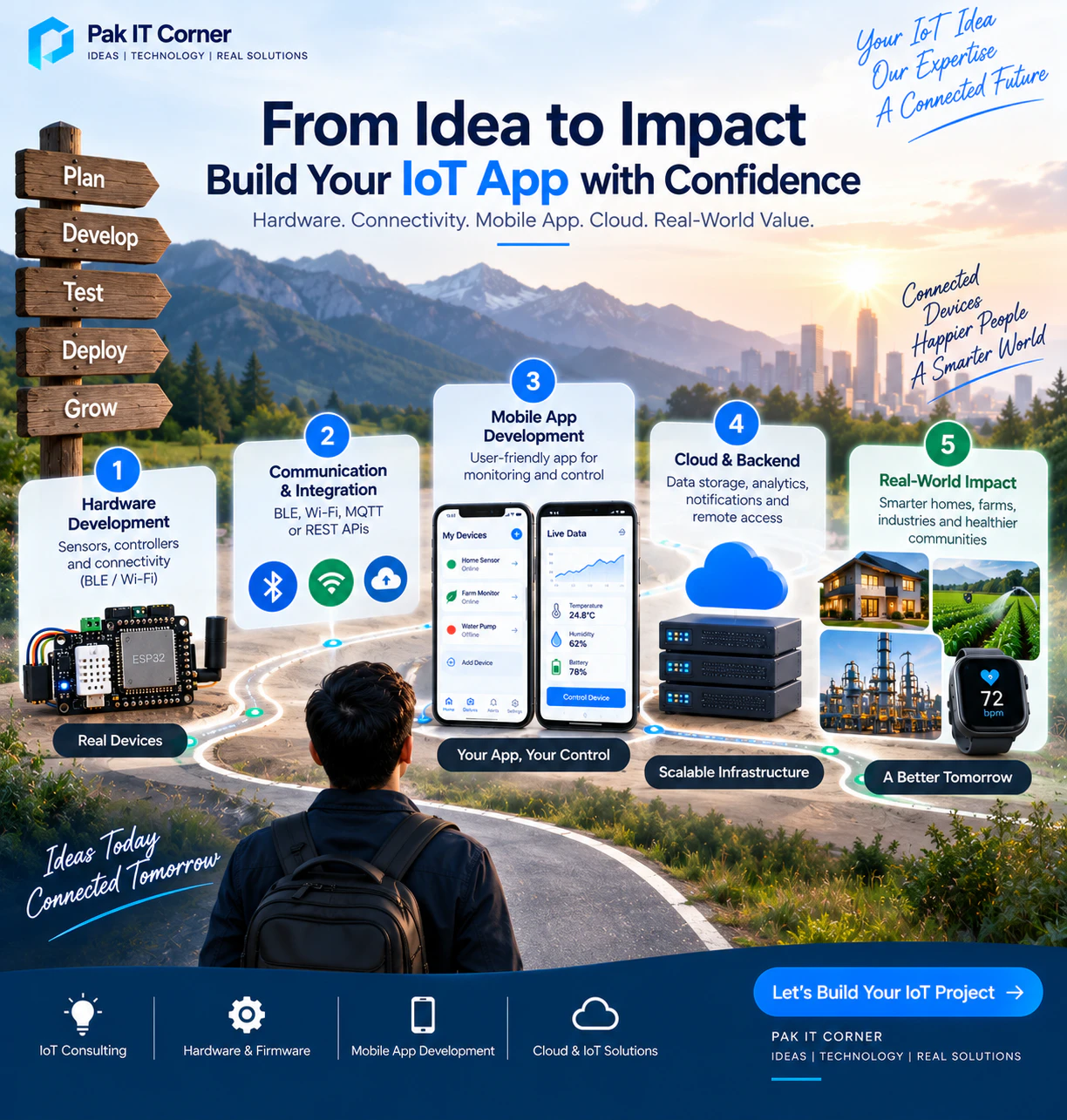
When Should You Choose BLE?
BLE is a strong choice when:
- The device is battery powered
- Communication is primarily local
- Internet is not required
- Low power consumption is important
- The smartphone is usually nearby
- The device needs simple provisioning
- Only moderate amounts of data are transferred
Typical examples include wearables, trackers, portable sensors, smart locks, and configuration tools.
When Should You Choose Wi-Fi?
Wi-Fi is a strong choice when:
- Remote access is required
- Cloud connectivity is important
- Higher data rates are needed
- The device has sufficient power
- Users need access from anywhere
- Real-time cloud monitoring is required
Typical examples include smart-home products, security systems, industrial monitoring, agricultural systems, and connected appliances.
When Should You Use Both BLE and Wi-Fi?
Using both can provide an excellent user experience.
BLE can handle:
- Device discovery
- Initial setup
- Wi-Fi provisioning
- Local diagnostics
- Recovery
Wi-Fi can handle:
- Cloud communication
- Remote monitoring
- Historical data
- Notifications
- OTA firmware updates
This architecture is commonly suitable for connected consumer and industrial products.
How Much Does IoT App Development Cost?
IoT application cost depends on much more than the number of screens.
Important factors include:
- BLE integration
- Wi-Fi provisioning
- Android and iOS support
- Cloud backend
- MQTT infrastructure
- Real-time dashboards
- User authentication
- Multiple-device management
- Notifications
- Historical data
- OTA firmware updates
- Security
- Firmware integration
- Hardware testing
A basic local BLE controller is significantly simpler than a complete cloud-connected product with multiple device types and user roles.
The project should therefore be estimated based on the complete architecture rather than the mobile interface alone — see our guide to mobile app development cost in 2026 for detailed pricing breakdowns.
Final Thoughts
A successful IoT application is more than a remote control for hardware.
It is part of a complete system involving:
Hardware + Firmware + Connectivity + Mobile App + Cloud
BLE provides efficient local communication and is particularly useful for battery-powered devices and provisioning.
Wi-Fi provides network and cloud connectivity, making remote monitoring and control possible.
Many connected products benefit from combining both.
The most important part is designing the complete architecture before development begins.
When hardware, firmware, communication protocols, applications, and backend systems are designed together, the final product becomes easier to use, easier to maintain, and more reliable.
How Pak IT Corner Can Help
Pak IT Corner develops connected applications that communicate with real hardware.
Our IoT app development capabilities include:
- Android IoT applications
- iOS IoT applications
- Flutter cross-platform applications
- BLE integration
- Wi-Fi provisioning
- ESP32 integration
- Real-time sensor monitoring
- Device control
- MQTT integration
- REST API integration
- Cloud dashboards & web apps
- Firebase integration
- Push notifications
- Multiple-device management
- OTA update integration
- Device status and diagnostics
- Firmware and application integration
- Complete IoT product development cost breakdown (2026)
Where a project also requires custom electronics, PCB design and embedded hardware development support can complement the application work. To explore end-to-end budgets across hardware, firmware, cloud, and companion mobile apps, read our 2026 IoT product development cost guide. The IoT app and user experience should remain the center of the connected product — see examples in our portfolio.
Frequently Asked Questions
What is the best connection method for an IoT mobile app?
It depends on the product. BLE is excellent for low-power local communication, while Wi-Fi is better when devices need cloud connectivity or remote access. Many IoT products use both.
Can an ESP32 connect directly to a mobile app?
Yes. An ESP32 can communicate directly with a smartphone using BLE or local Wi-Fi, depending on the application architecture.
Does BLE require internet access?
No. BLE communication can work directly between a smartphone and nearby hardware without internet access.
Can I control an ESP32 from anywhere using Wi-Fi?
Yes, when the device is connected to an internet-accessible backend or cloud service designed for remote communication.
Why use BLE for Wi-Fi provisioning?
BLE allows the mobile application to securely communicate network configuration information to a nearby device without requiring the user to manually interact with a temporary Wi-Fi network.
Can Flutter communicate with BLE devices?
Yes. Flutter applications can communicate with BLE hardware using appropriate platform integrations or packages. Testing on both Android and iOS remains important.
Should my IoT product have a cloud backend?
Not necessarily. Local-only products may not need one. A backend becomes useful when remote access, historical data, notifications, account management, analytics, or multi-device management are required.
Can an IoT app support multiple devices?
Yes. A properly designed application and backend can manage multiple devices under one account, with each physical product assigned a unique identity.
Is MQTT better than REST for IoT?
Neither is universally better. MQTT is particularly useful for lightweight real-time messaging and many connected devices, while REST APIs are convenient for request-response operations and integration with conventional web services.
How important is security for an IoT app?
Very important. Connected products can expose physical devices and user information, so authentication, encrypted communication, access control, secure device identities, and safe update mechanisms should be considered from the beginning.
Ready to Connect Your Hardware to a Mobile App?
Every successful IoT application starts with a well-designed architecture that connects hardware, firmware, communication protocols, and cloud services seamlessly.
Pak IT Corner specializes in building companion mobile applications, BLE & Wi-Fi integrations, and custom IoT systems — engineered for reliability, security, and exceptional user experience.